
I've been in production incident calls at 2 AM more times than I care to remember. And almost every single one of them followed the same pattern: someone shipped a new release, it went to all users at once, something broke, and now a dozen engineers are staring at dashboards trying to figure out how fast they can get the old version back up.
The frustrating part? Most of those incidents were completely avoidable. Not because the code was bad — sometimes it genuinely was fine in every test we ran. But because we shipped blind. We pushed to 100% of users and crossed our fingers. That's not a deployment strategy. That's gambling with your users' experience.
Canary deployment is what I'd recommend to any team that's tired of that feeling. Not because it's trendy or because Netflix does it — but because it's one of the few deployment strategies that genuinely changes your relationship with production.
What Even Is a "Canary" Deployment?
The name comes from coal mining. Miners used to carry canary birds underground because canaries are far more sensitive to carbon monoxide than humans. If the canary died, the miners knew to get out before they were affected. Grim, but effective.
In software, the logic is identical. Instead of exposing all your users to a new release immediately, you expose a small group first. If something's wrong, you catch it while most users are still on the stable version — and you pull back before the damage spreads.
But here's what most tutorials skip: canary deployment is not just a deployment technique. It's a risk management philosophy baked into your infrastructure. Understanding that distinction is what separates teams that implement it well from teams that implement it and still have 2 AM incidents.
The Core Mechanic: Running Two Versions at the Same Time
This is the thing that confuses people when they first encounter canary deployments: you're not replacing your old version. You're running both simultaneously.
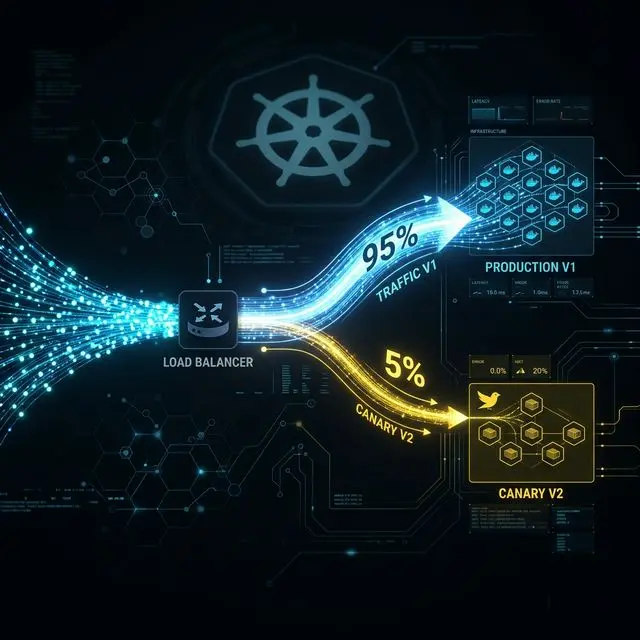
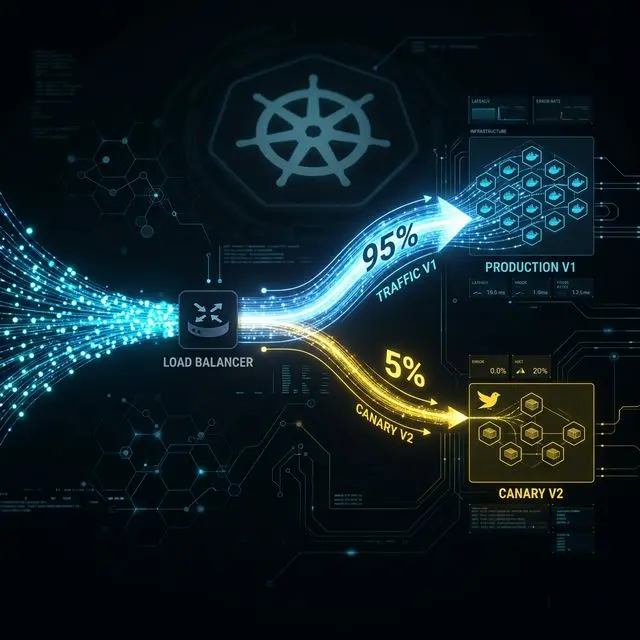
Your stable version (v1) stays up and serving the majority of traffic. Your new version (v2, the canary) receives a small slice — typically somewhere between 1% and 5% to start. The infrastructure splits incoming requests between the two based on rules you define.
Most users never know anything changed. They hit v1 like always. A small group hits v2. Your team watches what happens.
That's it. That's the entire concept at its core. Everything else — the monitoring setup, the rollout stages, the rollback mechanism — is built on top of this single idea: don't commit to 100% until you've validated at a smaller scale with real users.
How the Traffic Split Actually Happens
You have three main options depending on your infrastructure:
Load Balancer Weighted Routing
The most straightforward approach. Your load balancer — AWS ALB, NGINX, HAProxy — assigns a percentage weight to each upstream target. Say 95% to your v1 target group, 5% to v2. Every incoming request gets randomly assigned based on those weights at the network layer. This is where most teams start, and for good reason: it's simple, fast, and doesn't require additional tooling.
API Gateway Rules
Operate at the API layer, giving you more flexibility — route based on request headers, query parameters, or calling service identity. Useful when you're running microservices and need per-service canary control rather than a single global split.
Service Mesh Routing (Istio)
The most powerful option for teams running Kubernetes at serious scale. Istio's VirtualService resource gives you granular control: weight-based routing, header-based routing, fault injection for testing, circuit breaking — all configurable without touching your application code. The tradeoff is operational complexity. It's worth it at scale; probably overkill for a five-person team running three services.
Canary vs Feature Flags
One important clarification: canary deployment and feature flags are different tools, even though they're often used together. A feature flag controls whether a feature is visible at the application layer — inside your code, after the request has already arrived. Canary routing controls which version of your application receives the request at all — at the infrastructure layer, before your code runs. In mature pipelines, you'll see both working in tandem.
What You're Actually Monitoring During the Canary Phase
Most teams set up canary deployments but monitor the wrong things. Or they monitor the right things but use the wrong statistics. Here's what actually matters:
-
Error rates: Watch your 5xx rates on the canary cluster versus your stable cluster. Don't look at absolute counts — look at rates relative to request volume, because the canary receives far fewer requests. Rate comparison is what matters.
-
Latency at p95 and p99, not averages: Averages are useless for latency monitoring. A new version that's 10ms faster for 95% of requests but 2 seconds slower for 5% will look fine on average while causing a terrible experience for a meaningful chunk of users. p95 and p99 show you what's happening at the tails, where real user pain lives.
-
Resource consumption: CPU, memory, garbage collection pause times. A new version that quietly uses 40% more memory under the same load will eventually cause problems at scale. Catching it at 5% traffic is the entire point.
-
Business metrics — non-negotiable: I've seen technically flawless deployments that were quietly destroying conversion rates. No errors. Perfect latency. And checkout completion was down 4%. Business metrics show up where error logs don't.
Practical notes: your telemetry needs to be version-tagged from day one. Every log line, every metric, every distributed trace needs a label that tells you whether it came from v1 or v2. Also, define your success criteria in advance. "Error rate on v2 must stay within 10% of baseline for 30 consecutive minutes" is a criterion. "We'll know it's working if we see it" is not.
The Rollout Stages: Why the Percentages Matter
A typical progression: 1–5% → 20% → 50% → 100%, with a monitoring window at each stage before proceeding.
The specific percentages matter less than the principle: each stage gives you more data before you expose more users. At 5%, you're validating basic health. At 20%, you're getting statistically meaningful signal you can trust. At 50%, you've run a controlled test with real production load. By the time you hit 100%, you have substantial evidence the release works — you're not hoping.
The time windows between stages depend on your traffic volume and risk profile. A high-traffic consumer app might need only 15 minutes per stage. A billing system change might warrant overnight observation. And critically: don't set arbitrary stage timers and then ignore the metrics. If you're automatically advancing on a schedule without actually reviewing the data, you've built a canary deployment that doesn't protect you from anything.
Rollback: This Is Where Canary Deployment Really Earns Its Keep
Let me be direct: rollback in a canary deployment is a routing change, not a redeployment.
Your stable version never went down. It's still running, still serving 95% of traffic, still healthy. When you need to roll back, you update the routing weights: canary drops from 5% to 0%, stable goes from 95% to 100%. Your load balancer propagates that change in seconds. No pipeline to trigger. No containers to restart. No health checks to wait for.
The whole thing takes under 30 seconds.
Compare that to a traditional emergency redeployment during a production incident: you trigger a rollback pipeline, it takes 10–15 minutes, the old version needs to be fetched, deployed, and health-checked. Meanwhile, every user is experiencing degraded service.
The psychological difference alone is worth the investment. When you know you can roll back in 30 seconds, your relationship with deployments changes. One important nuance: rollback is easy for the application layer. Rollback for database schema changes is harder, which is why backward compatibility is critical — more on that below.
Region-Based and Header-Based Rollouts: Beyond Basic Percentage Splits
Header-Based Routing
Lets you make deterministic routing decisions for specific users instead of random ones. By setting a header — via a cookie, a client-side flag, or injection at the API gateway — you can ensure specific users always hit the canary version. This is how teams do internal dogfooding: your entire engineering organization hits the new version, while external users remain on stable. Then you expand to beta users, then to a broader percentage.
Region-Based Rollout
Standard practice for globally distributed systems. Deploy v2 to a single cloud region first — your smallest region by traffic volume — and monitor it there before expanding. This gives geographic isolation: if v2 has a region-specific problem, it stays contained before global exposure.
The most sophisticated setups combine all three: header rules for internal users, cookie-based routing for beta participants, weighted traffic expansion by region, and automated metric analysis at each stage. For most teams, starting with basic weighted routing and adding complexity only as needed is the right approach.
The Architecture Prerequisites Nobody Talks About Enough
This is where real-world implementations actually fail. Most canary deployment tutorials gloss over these prerequisites.
Your Services Must Be Stateless
If your application stores session state in local memory — user sessions, in-process caches tied to user identity — you have a problem. When requests from the same user can hit either v1 or v2, local state on one version isn't visible to the other. The session breaks. Externalize your session state to Redis, DynamoDB, or a similar shared store before you run canary deployments. This is good practice regardless, but canary deployment makes it a hard requirement.
Backward-Compatible Database Migrations
This is the constraint that bites teams hardest. Consider: v2 requires a new non-nullable column in the users table. You run the migration. Now v1 is still running, tries to insert a row without that column — and fails. You've broken your stable version by deploying your canary migration.
The solution is the expand-contract pattern. First, add the new column as nullable (expand phase) — old code ignores it, new code uses it. Deploy the canary. Validate it. Complete the rollout. Then in a subsequent deployment, backfill the column, add constraints, make it non-nullable (contract phase). Schema changes and application changes are always deployed in separate steps. Always.
Stable API Contracts
If a downstream service calls your API and your canary version changes the response structure — removes a field, renames a key, changes a type — you'll break that downstream service for the percentage of requests hitting your canary. Version your APIs properly. Treat breaking changes as separate, coordinated releases.
Observability Is a Prerequisite, Not an Afterthought
Version-tagging your telemetry needs to be built into your logging and metrics pipelines from the start. If you're adding version labels to metrics as a manual step during canary deployment, you'll forget, or do it inconsistently, and your monitoring will be unreliable when you need it most.
Canary vs Blue-Green: An Honest Comparison
These two strategies are often presented as competitors. They're more accurately described as tools for different situations.
Blue-Green Deployment
Runs two identical environments simultaneously. When ready to release, you switch 100% of traffic from blue to green instantly. Rollback is equally instant: switch back to blue. It's clean, simple, and fast. But there's no gradual validation — the moment you flip the switch, every user is on the new version. Blue-green is a great fit for changes where you're highly confident and want a clean cutover. Less appropriate for high-risk changes where you want to observe behavior at small scale first.
The Hybrid Approach
Sophisticated teams use both: blue-green for provisioning (spin up a complete new environment), canary for traffic migration (shift users gradually). You get clean environment isolation and progressive exposure. For teams running Kubernetes, Argo Rollouts implements this hybrid approach natively.
At Bytevault Infotech, we help engineering teams design and implement production-grade deployment strategies tailored to their specific infrastructure and risk tolerance.
A Realistic Assessment of the Trade-offs
-
The complexity is real. Running two versions simultaneously means double the operational surface area during the rollout window. Your on-call engineer at 2 AM needs to know whether a problem is on the canary or the stable version — and make the right call quickly.
-
Database migration complexity is genuinely annoying. The expand-contract pattern is correct, but it adds steps to every schema change. Teams with high migration velocity feel this friction.
-
Canary doesn't help with all failure modes. If your new version has a failure that only appears under sustained load — a memory leak that takes hours to manifest — a 30-minute observation window at 5% traffic won't catch it. You need longer observation windows for those cases.
-
Stateless service requirements are a real constraint. Teams with legacy stateful services can't implement proper canary routing without refactoring first. That's not a small undertaking.
None of this means you shouldn't use canary deployment. It means you should go in clear-eyed about what it is, what it protects against, and what work it requires from your team.
What to Actually Say in System Design Interviews
The vocabulary that signals real experience:
"Weighted traffic splitting at the infrastructure layer" — shows you understand the implementation, not just the outcome.
"p95 and p99 latency comparison between canary and baseline" — shows you actually think about tail latency, where user experience problems live.
"Rollback via routing rule update, not redeployment" — the single most differentiating phrase. It shows you understand canary as an architecture where both versions coexist.
"Backward-compatible schema migration as a prerequisite" — proactively raising this shows you've thought about the database layer, which most candidates skip entirely.
"Blast radius reduction" as the core purpose — this is how engineering leadership thinks about risk. Using the term signals you think about deployment in terms of risk management, not just feature shipping.
The Bigger Picture: Deploying With Confidence
Canary deployment is genuinely useful. But the most underrated benefit isn't the technical capability — it's what it does to a team's culture around deployments.
When you know a deployment can be rolled back in 30 seconds, the fear around shipping decreases. When you know a failure will be caught at 5% traffic rather than 100%, the stakes of any individual deployment go down. When you have 30 minutes of real production data before you commit to the full rollout, you're making an informed decision rather than hoping.
Teams that deploy this way ship more frequently, catch problems earlier, and recover from failures faster. The throughput improves not because they're rushing but because the feedback loop is tighter and the cost of mistakes is lower.
That's what production-grade deployment practices actually look like — not flashy tooling or clever architecture, but boring, reliable systems that make your team's job less stressful and your users' experience more consistent.
Canary deployment is one of the clearer examples of that principle. Once you've used it properly, deploying without it feels like driving without a seatbelt.